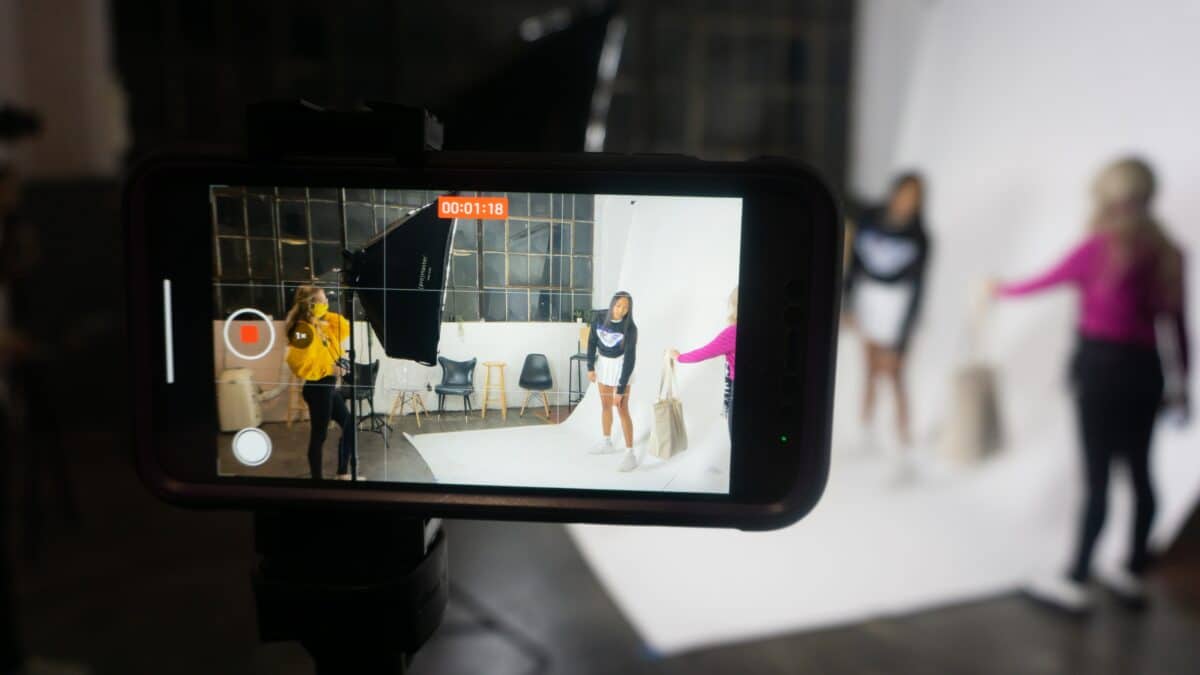

In this digital age, smartphones have become powerful tools that can transform anyone into a filmmaker. If you’re a student filmmaker with limited resources, your iPhone can be an excellent companion for creating a captivating short film. Here are ten easy tips to help you maximize the potential of your iPhone and create impressive films. Let’s get started!
Tip # 1: Understand Your iPhone’s Capabilities
Before diving into filming, take some time to familiarize yourself with your iPhone’s camera features. Experiment with different shooting modes, resolutions, and frame rates. Understand how to adjust exposure, focus, and white balance to capture the best possible footage.
Here are some practical examples to help you familiarize yourself with your iPhone’s camera features and capture the best possible footage:
Shooting Modes
Explore the different shooting modes available on your iPhone, such as Photo, Video, Time-lapse, and Slow Motion. Each mode offers unique creative possibilities for your short film.
Resolutions
Experiment with different resolution settings, ranging from standard HD (720p) to high-definition 4K. Keep in mind that higher resolutions provide greater visual detail but may result in larger file sizes.
Frame Rates
Adjust the frame rate settings to control the speed and smoothness of motion in your footage. Standard frame rates like 24 fps or 30 fps are commonly used, while higher frame rates like 60 fps or 120 fps can create stunning slow-motion effects.
Exposure
Learn to control the exposure settings to ensure your shots are properly lit. Tap on the screen to adjust the exposure manually or use the exposure slider to brighten or darken your image. This helps you capture well-balanced and visually appealing footage.
Focus
Master the art of focusing to ensure your subjects are sharp and clear. Tap on the screen to set the focus point manually or enable autofocus for automatic focus adjustments. Experiment with different focus techniques to highlight specific elements or create depth of field effects.
White Balance
Understand the importance of white balance for accurate color representation. Use the white balance settings to adjust for different lighting conditions, such as daylight, tungsten, or fluorescent. This ensures your film maintains a consistent and natural color tone.
Gridlines and Composition
Enable the gridlines feature on your iPhone’s camera settings to assist with composition. Align your subjects along the gridlines or use the rule of thirds to create visually appealing and well-balanced shots.
HDR (High Dynamic Range)
Explore the HDR feature to capture a wider range of light and shadow details in high-contrast scenes. HDR blends multiple exposures into a single image, resulting in more balanced and vibrant visuals.
Lock Exposure and Focus
When filming a scene with changing lighting conditions or moving subjects, consider using the AE/AF lock feature. Tap and hold on the screen to lock the exposure and focus settings, ensuring they remain constant throughout the shot.
Practice and Experiment
The key to mastering your iPhone’s camera features is practice and experimentation. Take the time to explore different settings, try various combinations, and learn from the results. As you gain experience, you’ll develop a better understanding of how to maximize the potential of your iPhone for filming.
Remember, these tips are just the beginning. Embrace the journey of learning and discovery as you embark on your filmmaking adventure with your trusty iPhone by your side.
Tip #2: Clean Your Lens
A smudged lens can result in blurry and dull footage. Always ensure your iPhone’s lens is clean before shooting. Use a microfiber cloth or a lens cleaning solution to gently remove any fingerprints or dirt. This simple step will significantly enhance the clarity of your shots.
To ensure the pristine quality of your footage, here’s a more detailed explanation of how to clean your iPhone’s lens:
Inspection
Before you start cleaning, inspect the lens for any visible smudges, fingerprints, or dirt particles. Hold your iPhone up to a light source or tilt it at different angles to identify any imperfections on the lens surface.
Gather Cleaning Materials
Prepare the necessary cleaning materials, such as a microfiber cloth and a lens cleaning solution. Microfiber cloths are ideal for cleaning delicate surfaces like camera lenses, as they are gentle and lint-free. Lens cleaning solutions are specifically formulated to remove smudges and debris without damaging the lens coating.
Dust Removal
Begin by using a gentle puff of air or a blower brush to remove any loose dust or debris from the lens surface. This step prevents particles from scratching the lens during the cleaning process.
Dampen the Cloth
Apply a small amount of lens cleaning solution to a corner of the microfiber cloth. Avoid spraying the solution directly onto the lens to prevent any liquid from seeping into the device.
Moisture Protection: When cleaning your iPhone, exercise caution to prevent moisture from entering any of the device’s openings. These openings include the charging port, headphone jack (if applicable), speakers, and microphone. Moisture can lead to corrosion or short circuits, causing potential harm to your iPhone.
Cleaning Products Usage: It is generally advised to refrain from using cleaning products on your iPhone unless following specific instructions for disinfecting purposes. Apple provides guidelines for safely disinfecting your device, and it is crucial to adhere to those instructions if you intend to use cleaning products.
Wipe the Lens: Gently wipe the lens in a circular motion with the dampened corner of the cloth. Start from the center of the lens and gradually move outward, applying gentle pressure. Avoid pressing too hard to prevent any potential damage.
Repeat if Necessary: If there are stubborn smudges or fingerprints, repeat the cleaning process using a clean portion of the microfiber cloth. Remember to reapply the lens cleaning solution as needed.
Final Inspection: Once you have thoroughly cleaned the lens, inspect it again to ensure that it is free from any remaining smudges or debris. If necessary, repeat the cleaning steps until you achieve a clear and pristine lens surface.
By dedicating a few moments to clean your iPhone’s lens before shooting, you can significantly enhance the clarity and quality of your footage. This simple yet essential step will ensure that your visuals are sharp, vibrant, and free from unwanted distractions caused by a smudged or dirty lens.
Tip #3: Use Tripods and Stabilizers
To maintain steady shots, consider investing in a tripod or a handheld stabilizer designed specifically for smartphones. Stable footage gives your film a professional look and prevents unnecessary distractions. Tripods also free up your hands, allowing you to focus on framing and directing.
Stability and Professional Look
A tripod or handheld stabilizer provides stability to your iPhone while filming, minimizing camera shake and vibrations. This stability translates into smooth and steady footage, giving your film a polished and professional appearance. It helps eliminate the distracting jittery movements that can detract from the overall quality of your shots.
Elimination of Unwanted Distractions
Unsteady footage can draw attention away from the content of your film and disrupt the viewer’s engagement. By using a stabilizing tool, you ensure that the focus remains on the subject and the story you are telling. It allows your audience to fully immerse themselves in the narrative without unnecessary distractions caused by shaky camera movements.
Hands-Free Operation
Tripods and handheld stabilizers free up your hands, allowing you to concentrate on framing your shots and directing your actors or subjects. With your iPhone securely mounted on a tripod or stabilized by a handheld device, you have greater flexibility in positioning and composing your shots. This enables you to focus on capturing the desired visual elements and guiding the performances without the added strain of holding the camera.
Smooth Panning and Tracking Shots
Stabilizing tools offer precise control over camera movements, facilitating smooth panning and tracking shots. Whether you need to follow a moving subject or capture sweeping landscape shots, tripods and stabilizers ensure fluid and controlled camera movements. This enhances the visual storytelling and adds a professional touch to your film.
Versatility and Portability
Many tripods and handheld stabilizers designed for smartphones are compact, lightweight, and portable, making them convenient for student filmmakers. They can be easily carried and set up in various shooting locations, enabling you to explore different environments and perspectives for your film.
Remember, when selecting a tripod or handheld stabilizer, ensure that it is compatible with your iPhone model and offers the necessary features for your specific filmmaking needs. Experiment with different stabilization techniques and explore the creative possibilities they bring to your storytelling. By incorporating stable shots into your film, you elevate its visual quality and captivate your audience with a polished and professional presentation.
Tip #4: Master Composition and Framing
Composition is key to visually engaging storytelling. Apply the rule of thirds, leading lines, and balance your shots. Experiment with different angles and perspectives to create dynamic visuals. Keep in mind that your iPhone’s screen can display gridlines to help you adhere to compositional guidelines.
Rule of Thirds
The rule of thirds is a fundamental compositional guideline that divides your frame into a 3×3 grid using two horizontal and two vertical lines. Positioning your main subjects along these gridlines or at their intersections adds visual interest and balance to your shots. With your iPhone’s gridline feature, you can easily align your subjects and elements within the frame to adhere to this rule.
Leading Lines
Incorporating leading lines is another powerful technique to guide the viewer’s attention and create a sense of depth in your shots. These lines can be natural or man-made elements like roads, fences, or architectural features that lead the viewer’s eyes towards the focal point of your composition. Experiment with different angles and perspectives to maximize the impact of leading lines in your visual storytelling.
Balance
Achieving balance in your shots helps create a harmonious composition. Consider the visual weight and placement of your subjects or objects within the frame. Balance can be symmetrical, with elements evenly distributed on both sides, or asymmetrical, with a deliberate imbalance that adds tension or visual interest. Experiment with different arrangements to find the right balance for your storytelling purposes.
Angles and Perspectives
Explore various angles and perspectives to add depth and visual dynamics to your shots. Experiment with high and low angles, bird’s-eye view, or worm’s-eye view to present different viewpoints and evoke specific emotions. The unique advantage of using an iPhone is its portability, allowing you to easily maneuver and capture shots from unconventional angles or tight spaces.
Gridlines on iPhone Screen
Leverage the gridline feature available on your iPhone’s camera settings. The gridlines overlay on your screen provide a visual guide to help you align your subjects, elements, and horizons according to compositional guidelines. This feature assists in achieving a balanced composition and enables you to create visually pleasing shots.
Remember, composition is a creative tool, and there are no strict rules. Experimentation and exploration are key to finding your unique visual style and storytelling approach. Use your iPhone’s camera as a canvas to try out different compositions, angles, and perspectives. Embrace the opportunity to capture dynamic visuals that enhance the impact of your narrative and engage your audience on a visual level.
Tip #5: Utilize Natural Lighting
Natural lighting can work wonders for your film’s aesthetics. Shoot during the golden hours—shortly after sunrise or before sunset—for soft, warm light. Avoid harsh overhead sunlight that creates unflattering shadows. Experiment with the position of your subjects relative to the light source to achieve the desired effect.
Golden Hours
The golden hours, which occur shortly after sunrise and before sunset, offer a magical quality of soft, warm light. During these times, the sun is low on the horizon, casting a flattering glow on your subjects and surroundings. Shooting during the golden hours can elevate the visual appeal of your film, enhancing the mood and evoking a captivating atmosphere.
Harsh Overhead Sunlight
While natural light is desirable, harsh overhead sunlight can create unflattering shadows and washed-out scenes. Avoid shooting in direct sunlight when the sun is high in the sky, as it can result in harsh contrasts and loss of detail. Instead, seek shade or wait for cloud cover to diffuse the light for more even and pleasing illumination.
Positioning of Subjects
Experiment with the positioning of your subjects relative to the light source to achieve the desired effect. Placing your subjects facing the light can create a beautiful and luminous effect, while backlighting can create silhouettes or add a sense of depth. Don’t be afraid to explore different angles and perspectives to take full advantage of the natural light’s potential.
Reflectors and Diffusers
In situations where the natural light needs modification, consider using reflectors or diffusers to shape and control the light. Reflectors bounce light back onto your subjects, filling in shadows and adding a gentle glow. Diffusers soften and spread the light, reducing harsh contrasts. These tools can be improvised using white foam boards, reflector discs, or translucent fabrics to achieve the desired lighting effects.
Lighting Transitions
Keep in mind that natural lighting changes throughout the day, influencing the mood and visual tone of your scenes. Embrace these transitions as opportunities to add variety and narrative depth to your storytelling. For example, shooting during the transition from daylight to dusk can create a sense of suspense or evoke a different emotional tone.
Remember to be observant of the natural light’s qualities and adapt to the specific environment and narrative requirements of your film. Embrace the interplay between light and shadow, and use it as a creative tool to enhance the visual impact of your storytelling. By harnessing the power of natural lighting, you can create captivating and visually stunning moments in your iPhone films.
Tip # 6: Enhance Audio Quality
Clear and high-quality audio is crucial for a professional-looking film. Consider using an external microphone compatible with your iPhone to improve sound capture. There are various options available, from lavalier microphones to shotgun microphones. Additionally, minimize background noise by choosing quiet locations for dialogue scenes.
External Microphones
While the built-in microphone of your iPhone can capture decent audio, using an external microphone can significantly enhance the sound quality. There are various types of microphones available that are compatible with iPhones, including lavalier microphones, shotgun microphones, and handheld microphones. Each microphone has its specific strengths and best applications, so choose the one that suits your filming needs and budget.
Lavalier Microphones
Lavalier or lapel microphones are small and discreet, often clipped to the subject’s clothing. They offer excellent voice clarity and are ideal for interviews or situations where the subject is in close proximity to the camera.
Shotgun Microphones
Shotgun microphones are highly directional and capture sound from a focused area. They are great for recording dialogue or capturing audio from a distance. Shotgun microphones can be mounted on your iPhone or used with an additional grip or boom pole for better positioning.
Quiet Locations
Minimizing background noise is crucial for achieving clean and professional-sounding audio. When filming dialogue scenes, choose quiet locations away from distractions, such as traffic, machinery, or crowds. Find a controlled environment with good acoustics to minimize unwanted noise interference.
Wind Noise Reduction
Wind noise can be a common issue when filming outdoors. To reduce wind noise, consider using a foam windscreen or a furry wind cover (also known as a “deadcat”) on your external microphone. These accessories help to minimize the impact of wind on your audio recordings, resulting in cleaner and clearer sound.
Test and Monitor Audio
Before shooting important scenes, perform audio tests to ensure optimal sound capture. Listen to audio samples using headphones to monitor the quality and identify any potential issues, such as low volume, distortion, or background noise. This allows you to make adjustments and achieve the best possible audio recording.
Post-Production Editing
After filming, utilize video editing software or dedicated audio editing apps to further refine your audio. Adjust the levels, remove background noise, and apply equalization or other effects to enhance the overall sound quality. Take the time to synchronize the audio with your video for perfect alignment.
Remember, clear and high-quality audio is just as crucial as visually stunning footage for creating a professional-looking film. Investing in external microphones, selecting quiet locations, and paying attention to post-production audio editing can make a significant difference in the overall audio experience of your iPhone film. By prioritizing audio quality, you elevate the production value and immerse your audience in the story you’re telling.
Tip # 7: Experiment with iPhone Camera Apps
Explore third-party camera apps designed specifically for iPhone filmmaking. These apps offer additional features and controls that can enhance your filming experience. Some popular options include Filmic Pro, ProCam, and Moment Pro Camera. Research and experiment with different apps to find the one that suits your needs.
Additional Features and Controls
Third-party camera apps designed for iPhone filmmaking offer a wide range of additional features and controls that go beyond what the default camera app provides. These features can include manual controls for exposure, focus, white balance, and shutter speed, allowing you to have more creative control over your shots. Explore different apps to find the ones that offer the features that align with your specific needs and creative vision.
Improved Video Quality
Some camera apps provide options to shoot in higher resolutions or adjust the bit rate and compression settings, resulting in improved video quality. Higher resolutions give you more flexibility during editing and produce sharper and more detailed footage. By exploring different camera apps, you can find the ones that offer the best video quality for your filmmaking goals.
Advanced Filmmaking Tools
Many third-party camera apps include advanced filmmaking tools to assist you in capturing professional-looking footage. These tools may include focus peaking, zebra patterns for exposure, waveform monitors, and audio level meters. Utilizing these tools can help you achieve better focus, exposure, and audio levels, leading to more polished and visually appealing films.
Manual Control for Stability
Some camera apps allow you to manually lock exposure and focus, preventing the camera from continuously readjusting while filming. This feature is particularly useful when shooting dynamic or fast-paced scenes, ensuring that your footage remains stable and focused throughout.
Customizable Settings
Third-party camera apps often offer customizable settings, allowing you to tailor the app’s interface and functions to your preferences. You can create presets for different shooting scenarios, set up shortcuts for quick access to specific settings, or even customize the on-screen overlays for easier navigation. These customizable options provide a personalized and efficient workflow for your filmmaking process.
Research and Experimentation
With a plethora of camera apps available, take the time to research and experiment with different options. Read reviews, watch tutorials, and seek recommendations from other filmmakers to discover the apps that best align with your needs and creative style. Remember that each app has its unique features and user interface, so investing time in experimenting with different apps will help you find the ones that resonate with you.
By exploring third-party camera apps, you unlock a world of additional features, controls, and tools that can enhance your iPhone filmmaking experience. Take advantage of the advanced functionalities offered by apps like Filmic Pro, ProCam, and Moment Pro Camera to elevate your filming capabilities. Embrace research, experimentation, and customization to find the camera apps that align with your creative vision and contribute to the success of your short films.
Tip # 8: Utilize Slow Motion and Time-lapse
Take advantage of your iPhone’s slow-motion and time-lapse capabilities to add visual interest to your film. Slow-motion can emphasize specific actions or moments, while time-lapse can condense long processes or capture the passage of time creatively. Experiment with these features to add a unique touch to your storytelling.
Slow Motion
Slow-motion is a powerful tool for emphasizing specific actions or moments in your film. It allows you to capture and highlight details that might be missed in real-time. Experiment with different frame rates (such as 120 or 240 frames per second) to achieve varying degrees of slow motion. Slowing down fast-paced scenes can add a sense of drama, elegance, or even humor to your storytelling. Whether it’s a climactic action sequence, a subtle gesture, or the delicate movement of nature, utilizing slow motion can create impactful visual moments.
Time-lapse
Time-lapse is a technique that condenses long processes or captures the passage of time in a visually engaging way. By capturing a series of still images at predetermined intervals and combining them into a video, you can showcase the transformation or progression of a subject over an extended period. Time-lapse is ideal for capturing nature, cityscapes, or any scenario where changes occur gradually. From the blooming of flowers to the bustling activity of a busy street, time-lapse can compress hours or even days into mesmerizing seconds, adding a unique dynamic to your storytelling.
Storytelling Enhancement
Slow motion and time-lapse can be used strategically to enhance your narrative. Consider how the use of slow motion or time-lapse can convey emotions, emphasize key moments, or illustrate the passage of time within your story. By thoughtfully incorporating these techniques, you can heighten the impact of specific scenes and create a more immersive experience for your audience.
Experimentation and Creativity
Embrace experimentation and creativity when using slow motion and time-lapse. Play with different subject matters and explore their visual potential through these techniques. Whether it’s capturing the graceful movement of dancers in slow motion or capturing the transformation of a construction site through a time-lapse sequence, allow yourself to think outside the box and push the boundaries of your storytelling.
Technical Considerations
Keep in mind the technical considerations when using slow motion and time-lapse. Slow-motion footage generally requires more light, so ensure you have adequate lighting to maintain quality. Time-lapse sequences often benefit from using a tripod to maintain stability and consistency throughout the capturing process.
By leveraging the slow-motion and time-lapse capabilities of your iPhone, you can add a unique and visually captivating touch to your storytelling. Experiment with these features to highlight specific actions, condense time, or evoke emotions. The strategic use of slow motion and time-lapse can elevate the impact of your film and create memorable visual moments that enhance your storytelling prowess.
Tip # 9: Edit with Mobile Editing Apps
After filming, dive into the world of mobile editing apps to refine your film. Apps like iMovie, Adobe Premiere Rush, and LumaFusion offer powerful editing capabilities right on your iPhone. Familiarize yourself with the features and tools available in these apps, including trimming, transitions, color correction, and audio adjustments.
Convenience and Accessibility
Mobile editing apps bring the editing process right to your fingertips. With apps like iMovie, Adobe Premiere Rush, and LumaFusion readily available on your iPhone, you can edit your film anytime, anywhere. This convenience allows you to make quick adjustments, experiment with different edits, and seize creative inspiration whenever it strikes.
Powerful Editing Tools
Mobile editing apps offer a range of powerful editing tools that rival those found in traditional desktop software. Familiarize yourself with the features and tools available in these apps, such as trimming, splitting, and rearranging clips, adding transitions, applying color correction, adjusting audio levels, and incorporating visual effects. Each app has its unique set of features, so take the time to explore and experiment to find the one that best suits your editing needs.
Efficient Workflow
Mobile editing apps are designed with user-friendly interfaces and intuitive controls, streamlining your editing workflow. These apps provide efficient ways to navigate through your footage, organize your timeline, and make precise edits. Take advantage of features like drag-and-drop functionality, multi-track timelines, and real-time previews to enhance your editing efficiency.
Creative Possibilities
Mobile editing apps empower you to unleash your creativity and enhance your storytelling. Experiment with different editing techniques, such as adding overlays, text, or graphics to convey information or create visual interest. Explore various transitions to smooth scene transitions or evoke specific emotions. Adjust color grading to set the mood and tone of your film. Mobile editing apps offer a myriad of creative options to elevate your film and bring your artistic vision to life.
Export and Sharing
Once you’ve finished editing your film, mobile editing apps allow you to easily export and share your creation. You can export your film in different formats and resolutions, depending on your intended platform or audience. Whether you plan to showcase your film on social media, submit it to film festivals, or share it with friends and family, mobile editing apps provide convenient export options to suit your needs.
Continuous Learning and Growth
The more you delve into mobile editing apps, the more you’ll discover their vast capabilities and hidden features. Invest time in learning and exploring the various tools and techniques these apps offer. Watch tutorials, read guides, and engage with online communities to expand your editing knowledge and refine your skills. The learning process is continuous, and each project presents an opportunity for growth and improvement.
By embracing the world of mobile editing apps, you can refine your film and unleash your creativity. Dive into apps like iMovie, Adobe Premiere Rush, and LumaFusion to take advantage of their powerful editing tools and user-friendly interfaces. Explore the numerous possibilities these apps offer to trim, enhance, and perfect your footage. With mobile editing apps, you have the potential to transform your raw footage into a visually compelling and impactful short film.
Tip # 10: Share and Seek Feedback
Once your short film is complete, share it with your peers, instructors, or online communities. Embrace constructive criticism as an opportunity for growth and improvement. Participate in student film festivals or online platforms to showcase your work and connect with other aspiring filmmakers. Collaborate, learn, and continue to hone your craft.
Peer and Instructor Feedback
Share your film with your peers and instructors who have a keen eye for storytelling and technical aspects. Their constructive criticism and insights can provide valuable perspectives and help you identify areas for improvement. Embrace their feedback as an opportunity to grow and refine your filmmaking skills.
Online Communities
Take advantage of online platforms and communities dedicated to filmmaking. Share your film with fellow filmmakers who can provide feedback, support, and inspiration. Platforms like film forums, social media groups, and video-sharing websites allow you to connect with a broader community and gain exposure for your work.
Student Film Festivals
Consider submitting your short film to student film festivals. These festivals provide a platform to showcase your work to a wider audience and receive recognition for your efforts. Participating in film festivals not only allows you to gain exposure but also exposes you to the work of other talented filmmakers, fostering a sense of community and inspiration.
Collaborative Opportunities
Seek collaborative opportunities with other aspiring filmmakers. Join forces with writers, cinematographers, editors, and actors to create new projects together. Collaborating with like-minded individuals not only expands your network but also provides a valuable learning experience and the chance to grow as a filmmaker.
Embracing Constructive Criticism
When receiving feedback, approach it with an open mind and a willingness to learn. Embrace constructive criticism as a means to improve your craft and elevate the quality of your work. Remember that constructive feedback is not a personal attack but an opportunity for growth and development. Use feedback to refine your storytelling, technical skills, and overall filmmaking approach.
Continuous Learning
The filmmaking journey is a continuous learning process. Never stop seeking knowledge, honing your skills, and exploring new techniques. Stay updated on industry trends, attend workshops or webinars, and engage in conversations with fellow filmmakers. This commitment to learning ensures that you constantly evolve as a filmmaker and produce increasingly impactful and compelling films.
By sharing your completed short film, seeking feedback, and actively participating in the filmmaking community, you create opportunities for growth, collaboration, and recognition. Embrace feedback as a catalyst for improvement, connect with fellow filmmakers, and continue to refine your craft. Remember, the filmmaking journey is an ongoing process of learning and exploration. Embrace the feedback, incorporate what resonates with your vision, and always strive to push the boundaries of your creativity and storytelling abilities.
Conclusion
Armed with your iPhone, you hold a remarkable tool to transform your creative visions into reality. We trust that the tips provided in this article will prove valuable to you on your filmmaking journey. We invite you to share your thoughts and experiences in the comments section below, as we would love to hear how these tips have helped you in your own projects.
It’s important to note that the tips shared here assume you already have a story in mind. However, if you find yourself without a story yet and are seeking inspiration on what to film using your iPhone, we have you covered. Click here to read the exclusive article, “10 Captivating Ideas for Filming with Your iPhone: Exploring Storylines and Themes,” written for you. These suggestions can spark your creativity and guide you in finding a compelling concept for your next project.
Remember, filmmaking is a constantly evolving art form, and your iPhone offers a wealth of possibilities at your fingertips. Embrace the power of storytelling, experiment with different techniques, and continue to refine your skills. With passion, dedication, and the right tools, your iPhone can become a catalyst for bringing your imagination to life on the silver screen.