
Reference: StudentFilmmakers Magazine, December 2007. Multi-Cam Shooting: Technical Decisions Critical to Your Production: Time-code Syncing, Creating a Consistent Look, and Using a Good Monitor by Carl Filoreto. Pages 8 – 10.
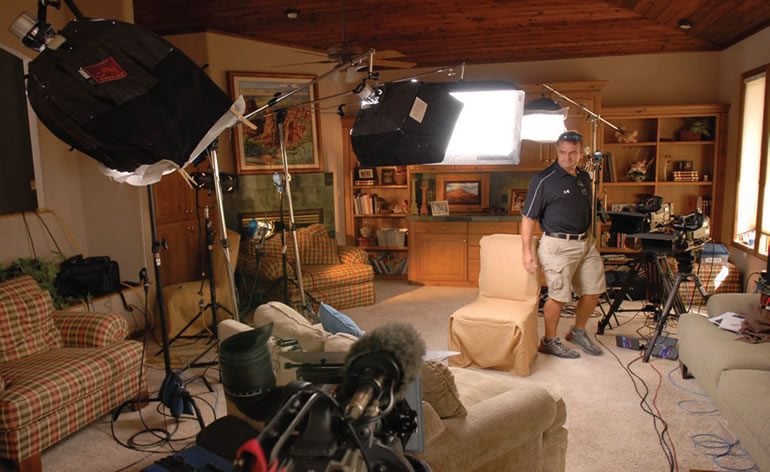
The multiple camera interview is a staple of programs ranging from broadcast network news magazines to bare bones documentaries. And this interview format presents an array of complex production decisions.
The first level of choices concerns the basics: where are the people involved in the interview going to be seated, and where will the two primary cameras be placed? Assuming that these critical decisions have already been made, let’s look at the next layer of technical production considerations. They’re somewhat unexciting and can be a bit tedious, but these decisions are critical to your production.
The first basic rule of thumb is essential: all the cameras involved in the interview need to be synched by time code. Most multi-camera interviews are arranged so that there’s interaction between the person conducting the interview and the interviewees. So when you’re in the edit room, you’ll be performing a number of match edits. Most editing programs have convenient setups which easily handle multi-camera edits, but only if the cameras are running the same time code. If they’re not, then the editor will age noticeably during the process, and no matter how may lattes you provide, their once cheery demeanor will rapidly turn into a continual fit of rage. Keeping the editor happy is very high on my priority list, especially if that editor is me.
Almost all higher-end cameras have BNC connections for generating and receiving time code. In an interesting choice of linguistic terms, one camera is chosen to be the master and will generate time code. The other camera(s) will be daisy-chained together using BNC cables and are considered the slaves. If the cameras are going to be in motion, making cables a hassle, then you can “jam synch” the cameras. This is accomplished by plugging each camera into the master, and acquiring the time code. The slave cameras need to be in a free run time code setting or the operation won’t work.
Each camera has its own personality, so the time codes will drift over time. If you’re going to be shooting for a while in this configuration, then you need to occasionally “re-jam” the cameras. Even a few frames of drift will create major headaches during the editing process. Also on the checklist, make sure that all the cameras are either configured for drop frame or non-drop frame.
Mismatched settings will create havoc during the edit.
Now, many lower-end DV/HDV/HD cameras don’t generate external time code. So what do you do if you’re in a situation where you absolutely can’t time code synch the cameras? Well, somehow you need to provide some type of timing reference. One solution: have somebody walk into the frame, clap their hands and verbally announce the time code. Not exactly perfect, but at least it provides the editor with a critical time reference. Or, you can rent an electronic slate and have all the cameras focus on it before the interview and before each tape change.
Another extremely important technical factor deals with creating a consistent look. In basic terms, you want all the cameras to look alike. And, I don’t mean that they all have grey bodies with silver and black controls. I’m talking about the image that each camera creates. For good or ill, camera looks can be set up in an infinite variety of ways. Ideally, in the pre-production decision process you examined this issue, and you purposefully chose cameras which are the same make and model.
Then, when you’re on location, you’ll only be concerned with matching the subtle nuances of each camera. Hopefully, your cameras can handle scene files, and you can simply upload the same file into each camera. Presto, the cameras instantly match, or at least they’ll be reasonably close.
Usually, the cameras will differ slightly in the “warmth” of the setup, and in the amount of detail seen in the image. In these cases, you can try to match the looks by playing with the internal menus or employing a device called a camera paint box.
I’ve also resorted to manipulating the white balance of each camera. Today, some cameras will allow you to thumb wheel your way through color temperatures, and select the one that’s right for you. That’s pretty slick, and it can quickly expedite your camera matching routine. Or, you can do it the old fashioned way, by experimenting with white balance cards. I’ve got a set of white cards that have gradually increasing shades of blue, which allows me to establish a certain degree of warmth for the camera look. On location, you can play with the cards and with each camera, trying to get the closest match for all the cameras. And, don’t try to over-think the situation. Maybe just dropping in a filter of some sort will resolve the issue.
Finally, and this is a rule that can’t be compromised, you must have a decent monitor with you on location. Each camera has to be routed into it, and then you can confidently engage in the process of comparing and contrasting each camera. It provides an unwavering reference point in your camera matching process.
Boring? You bet. Sometimes, it can be mind numbing. But I’ve been in situations where the clock is marching relentlessly forward, and we’re frantically running around trying to get disparate cameras to match. It’s not a pretty scene. Sure, you can resolve some of these issues during the post process, but your mission in the field is to make the editing process as seamless as possible. And remember, you’re trying to create and maintain an aura of believability in your production. If you’re shooting a scene with two cameras that have two different looks, well, the viewer will probably pick up on that, even if it’s at a subconscious level. A little vigilance in the field can prevent a lot of post production headaches. And it’ll help you minimize your latte bill.
Photos by Carl Filoreto.
Carl Filoreto is an award-winning DP, and his company is Elk Run Productions, Inc. (www.elkruntv.com), which has a roster of clients that spans corporations, production houses, crewing agencies, and broadcast and cable networks, including Dateline NBC, The Food Network, and The Travel Channel. Prior to starting his business, Carl won seven regional Emmy awards, numerous national and regional National Press Photographers awards, and multiple awards from Colorado Ski Country and the National Snowsports Journalists Association, while working at KMGH-TV in Denver, WTNH in New Haven, and WGGB in Springfield, Massachusetts.